Add and manage users - orderbird MINI

Contact Us

If you still have questions or prefer to get help directly from an agent, please submit a request.
We’ll get back to you as soon as possible.

Please fill out the contact form below and we will reply as soon as possible.

  • Knowledge Base PRO
  • Contact us
English (US)
US English (US)
DE German
  • Startseite
  • Working
  • Users & Permissions

Add and manage users

Written by Jens B.

Updated at June 13th, 2023

Contact Us

If you still have questions or prefer to get help directly from an agent, please submit a request.
We’ll get back to you as soon as possible.

Please fill out the contact form below and we will reply as soon as possible.

  • Starting
    First steps with your orderbird MINI Helpful information to get started Warranty information & care tips Card payment registration TSS and tax number
  • Working
    Deposit Users & Permissions Vouchers Daily work App settings
  • Analyzing
    MY orderbird - Analyze & export sales data MY orderbird - Digital receipts and receipt archive Everything about cashless payment with our partner Worldline American Express DATEV KassenSichV & GoBD Everything about cashless payment with and orderbird MINI our partner Nexi Germany
  • Cashbook
    Starting with your orderbird MINI cashbook Working with your orderbird MINI cashbook
  • Updating
  • Account and Hardware
    Info about your orderbird MINI Your MY orderbird account Multi user: you have more than one MINI device
+ More

Übersicht

Create new users Edit a user Good to know

Create user profiles for your employees on your orderbird MINI and assign them roles with rights.

Open the [Menu] > [Settings] > [User management] > [Manage users] on the device.

Create new users

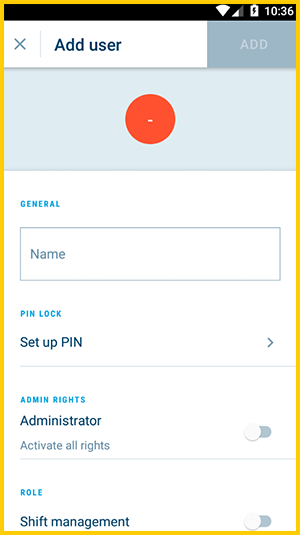
  1. Tap on "Add user" at the bottom
  2. Enter a name - it must be unique.
    EN_MINI_2.3_users_01.png
  3. Set a PIN for the user and enter it a second time for confirmation.
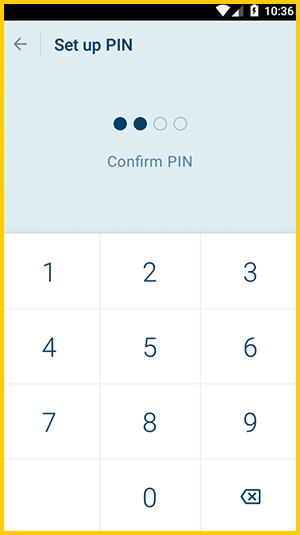
    EN_MINI_2.3_users_02.png
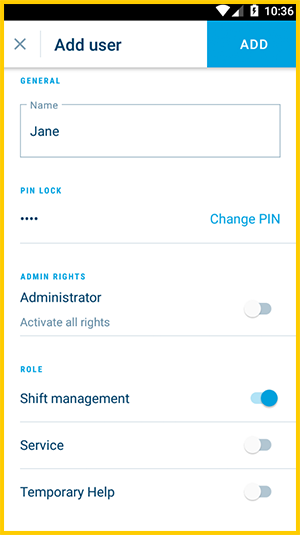
  4. Assign rights to your new user:
    EN_MINI_2.3_users_03.png
    • Administrator: The user has all rights
    • Role: The user has the rights of the corresponding roles. You can also activate multiple roles for the user. Read more: Add and assign roles 
    • No role: All permissions are disabled.
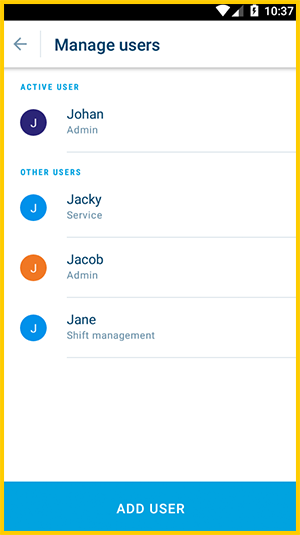
  5. Done!
    EN_MINI_2.3_users_04.png

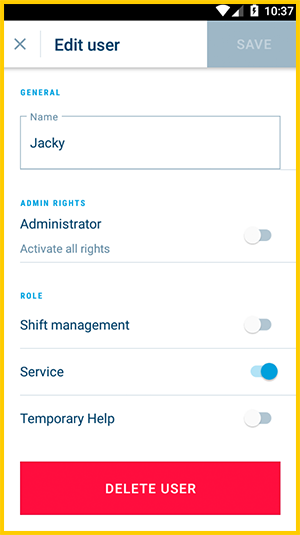
Edit a user

Tap on the name to edit this user. Here you can:
EN_MINI_2.3_users_05.png

  1. Change the PIN
  2. Edit the user:
    • Change the name,
    • change or disable its role,
    • or delete the user.

Good to know

  • Only users with the appropriate permission can edit user profiles.
  • All of them can change their own PIN - in [Menu] > [Settings] > [User management] > [Change own PIN].
user manage user add

Was this article helpful?

Yes
No
Give feedback about this article

Ähnliche Artikel

  • Add and assign roles

About orderbird

With over 17,000 customers — restaurants, cafés, bars, clubs, and beer gardens — orderbird is one of the leading Point of Sales systems for the hospitality industry in Europe. With the mobile POS system orderbird MINI, orderbird also offers a smart cash register solution for service providers, retailers, mobile hospitality, and the crafts.

orderbird was founded in 2011 and today employs more than 120 people.

Address

orderbird GmbH
Ritterstraße 12
D-10969 Berlin
Phone: 030 208 983 098

Opening hours

Monday: 09:00 - 18:00 Uhr
Tuesday: 09:00 - 18:00 Uhr
Wednesday: 09:00 - 18:00 Uhr
Thursday: 09:00 - 18:00 Uhr
Friday: 09:00 - 18:00 Uhr
Saturday: Geschlossen (außer Notfall-Support)
Sunday: Geschlossen (außer Notfall-Support)


© 2026 orderbird GmbH
  • Imprint
  • Privacy Policy
  • Legal Notice
Expand

Translation Unavailable

This article is currently available only in German. You are viewing the German version.