Application for card payment: Sole trader & GbR

Übersicht
Before you can use the cashless payment option with your orderbird MINI, you have to fill in the agreement with our partner Worldline. After you have registered and logged in to the orderbird MINI, you will receive an email with a link. Click on it to get to the online form and enter the requested information.
The most important points at a glance:
-
Attachments
Attach the following documents at the end of the form:- Business registration (in case of GbR from all owners)
- Proof of bank details (with bank, account holder, IBAN and date not older than two months)
-
Sole proprietorship
Enter your residential address under company information! (see also point 1). -
GbR
Enter all partners as beneficial owners (see also point 4).
Let's get started
Even as 13 steps seem to be a lot, you will be done faster than you think!
1. Your company data
Select "No" for "Do you have a commercial register number?" and enter your commercial tax number and your company data.
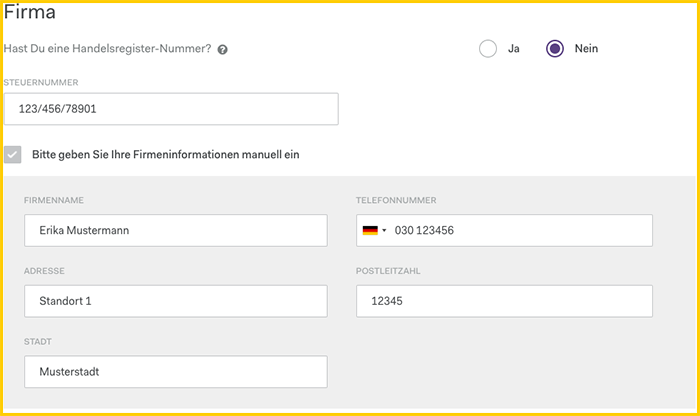
- Tax number: Please use the format 123/456/78901.
Attention: this does not mean your VAT ID! - Company name → Name of the sole proprietor or GbR (you can enter the name of your salon/shop/etc. later in 8. Sales location).
- Phone number: The phone number of the company
- Address: You...
- are a sole proprietorship: enter your home address!
- have a GbR: enter the company address
2. Company type
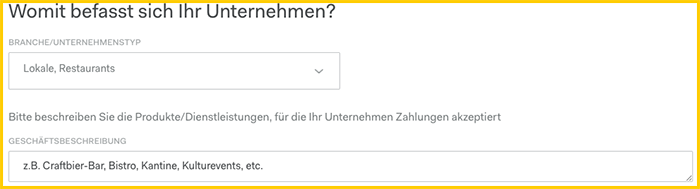
Select the appropriate company type from the "Industry/Company type" list. In the field "Business description" you can enter additional information about your company.
3. Contact information
If your contact information is not automatically filled in under "Contact", please provide your full name as well as a phone number and email address where you can best be reached.
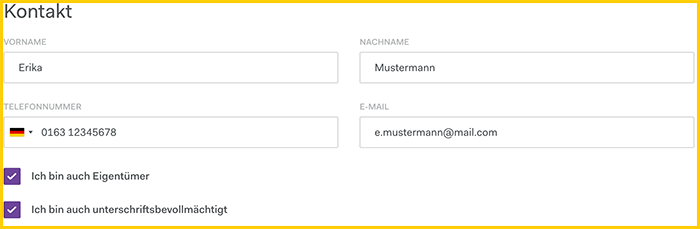
Email adress
Please note: You will use this email address to log in to the Worldline billing portal (reports.bambora.com) after the activation!
- Activate the option "I am also the owner" to transfer your data to the fields under "Ownership" into 4. Ownership of the company.
- Activate the option "I am also authorized to sign" to transfer your data into 10. signatory.
4. Ownership
Do not change this option but continue with the first one - "One or more people own directly or indirectly more than 25% of the company". Enter the information for all company owners who own at least 25%.
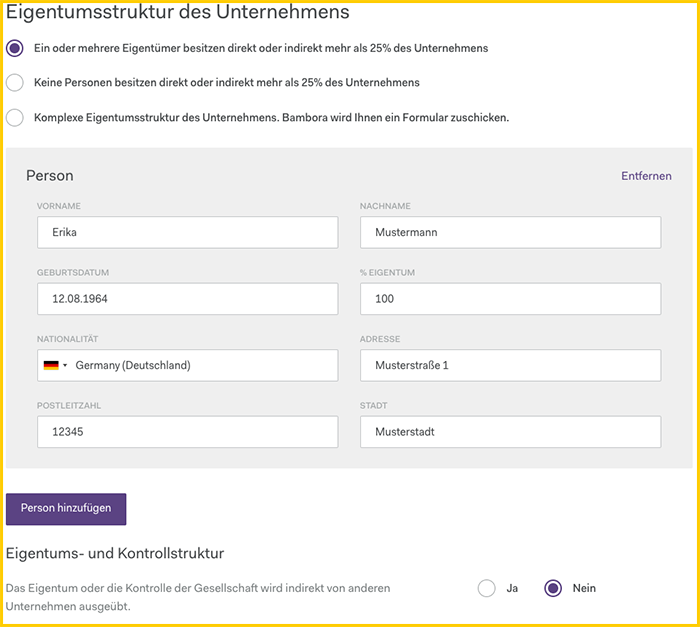
- “Vor-/Nachname” → full name as given in the ID
- “Geburtsdatum” → date of birth of the owner
- “% Eigentum” → percentage share in the company (100 for sole traders)
- “Nationalität” according to ID
- “Adresse” → private address as given in the ID, please note: if you moved recently and the new address is not shown in the registration document or ID we will need confirmation via a utility bill
For GbR add another person with min. 25% ownership by clicking on the button "Add person".
Leave the option "Eigentums- und Kontrollstruktur" at "nein" and continue.
5. Approximate turnover
The revenue data is mandatory for Worldline to comply with the requirements of the Anti-Money Laundering Act. These data are pure estimations and do not have to be 100% correct.
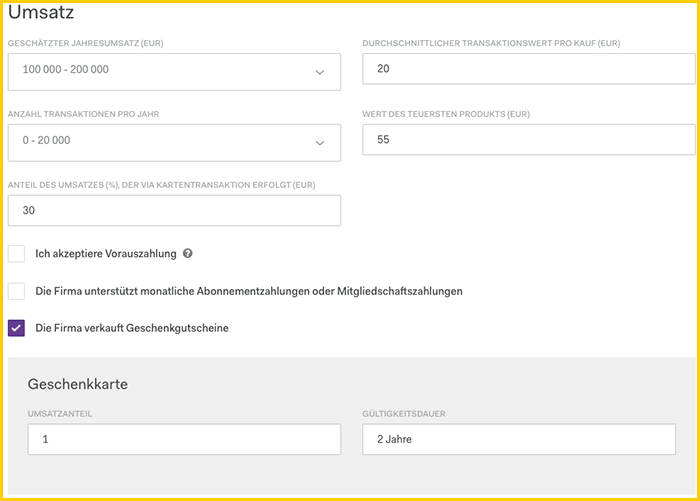
If you offer vouchers, click on the checkbox "The company is selling vouchers" and enter:
- "Umsatzanteil" → percentage of your total revenue from voucher sales.
- "Gültigkeitsdauer" → how long is the voucher valid
6. Settings & previous acquiring partner
If the "Settings" are not filled in automatically, please enter the following data:
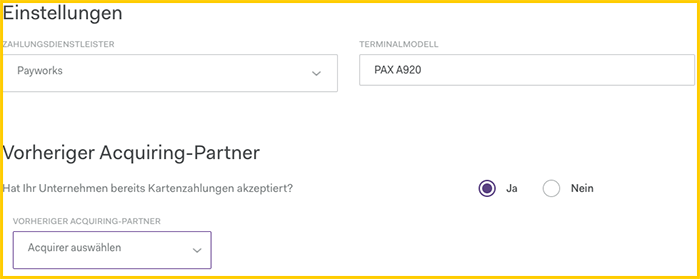
- “Zahlungsdienstleister” → Payworks
- “Terminalmodell” → PAX A920 (this is the terminal name of orderbird MINI)
"Vorheriger Acquiring-Partner": If you have accepted card payments before, please click on "Yes/Ja" and specify the previous acquiring partner. Otherwise continue with "No/Nein".
7. Bank details
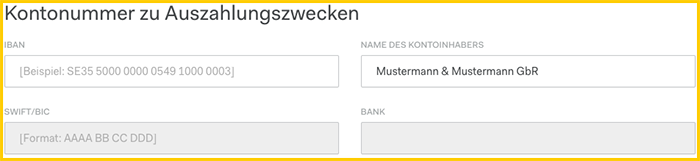
In "Account number for payment purposes" you enter your business account. The "Account holder name" has to be the official company name, i.e. the sole proprietor or the GbR. "SWIFT/BIC" and "Bank" will be filled in automatically when you enter the IBAN. If the IBAN is not correct, it will be deleted from the field.
8. Sales location
Here you give information on your shop / salon / café etc.
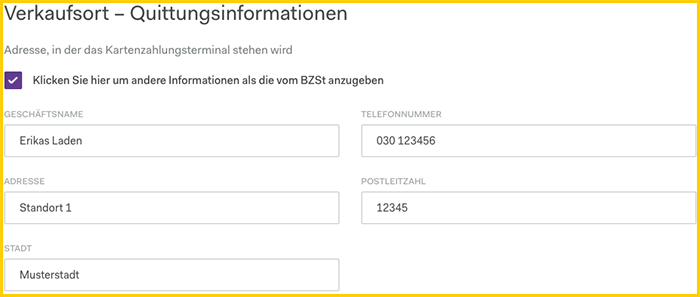
- “Geschäftsname” → the name of your shop that will be shown to your customer when the payment is booked from their bank account
- “Telefonnummer” → phone number
- “Adresse” → address has to match the registration documents. If the document is not up to date we will need other confirmation.
9. Further information (optional)
Use this field for additional information if necessary, e.g. if you want to receive the payments weekly instead of daily, etc. Otherwise you can leave this field blank.
10. Signatory
"Unterzeichner" are all owners of the company who own at least 25%.
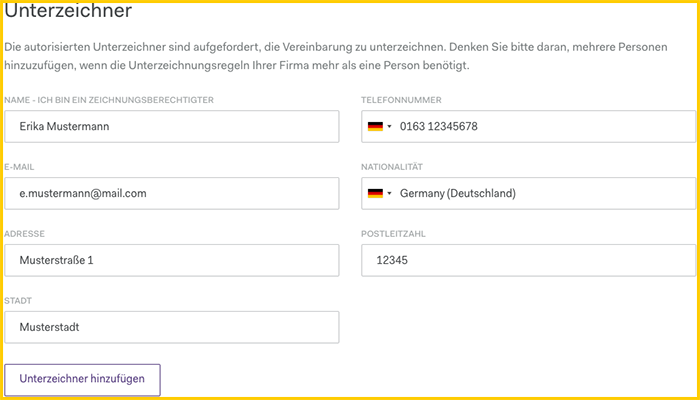
- “Name” → full Name as shown on the ID
- “Telefonnummer” → phone number
- “E-Mail” → to this email you will receive the email for the signature and the activation information
- “Nationalität” according to ID
- “Adresse” according to ID, please note: if you moved recently and the new address is not shown in the registration document or ID we will need confirmation via a utility bill
For GbR you can add another signatory by clicking on the button "Unterzeichner hinzufügen".
11. Politically exposed person
Is one of the holders a member of parliament/politician at federal and/or state level, or does he/she have business relations with such a person? If yes, the person must fill out an additional form. Select "Yes" for the appropriate option and download the form as a PDF. Otherwise, select "No" and continue.
12. Attachments
Now please upload 2 documents:
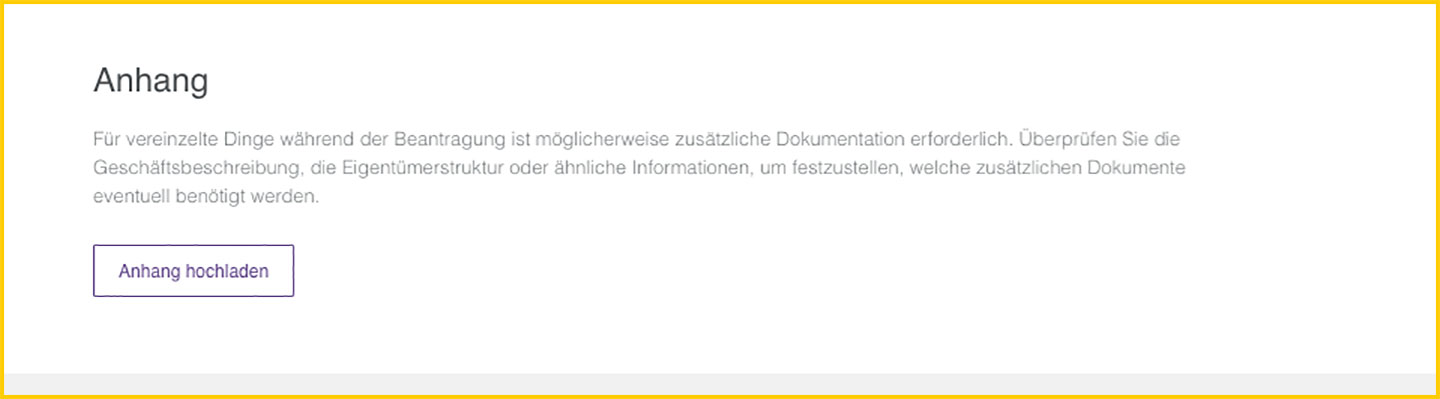
- a digital version of your business registration (for a GbR please upload the business registrations of all owners) and
- a bank statement, e.g. a screenshot from your online banking with full name, IBAN and bank name, not older than 2 months.
Or you can send the data to us via request, and we will gladly forward the documents to Worldline.
13. Digital signature & further documents
Great - you have now entered all necessary information. Now click on "Sign digitally" at the end of the application form. This will send an email with a link to all signers, and you will be redirected to the next page.
Click here for instructions for the signature: Application for card payment: Digital signature