Change your bank information in MY orderbird - orderbird MINI

Contact Us

If you still have questions or prefer to get help directly from an agent, please submit a request.
We’ll get back to you as soon as possible.

Please fill out the contact form below and we will reply as soon as possible.

  • Handbuch orderbird MINI
  • Kontakt aufnehmen
English (US)
US English (US)
DE German
  • Startseite
  • Account and Hardware
  • Your MY orderbird account

Change your bank information in MY orderbird

Written by Jens B.

Updated at June 12th, 2023

Contact Us

If you still have questions or prefer to get help directly from an agent, please submit a request.
We’ll get back to you as soon as possible.

Please fill out the contact form below and we will reply as soon as possible.

  • Starting
    First steps with your orderbird MINI Helpful information to get started Warranty information & care tips Card payment registration TSS and tax number
  • Working
    Deposit Users & Permissions Vouchers Daily work App settings
  • Analyzing
    MY orderbird - Analyze & export sales data MY orderbird - Digital receipts and receipt archive Everything about cashless payment with our partner Worldline American Express DATEV KassenSichV & GoBD Everything about cashless payment with and orderbird MINI our partner Nexi Germany
  • Cashbook
    Starting with your orderbird MINI cashbook Working with your orderbird MINI cashbook
  • Updating
  • Account and Hardware
    Info about your orderbird MINI Your MY orderbird account Multi user: you have more than one MINI device
+ More

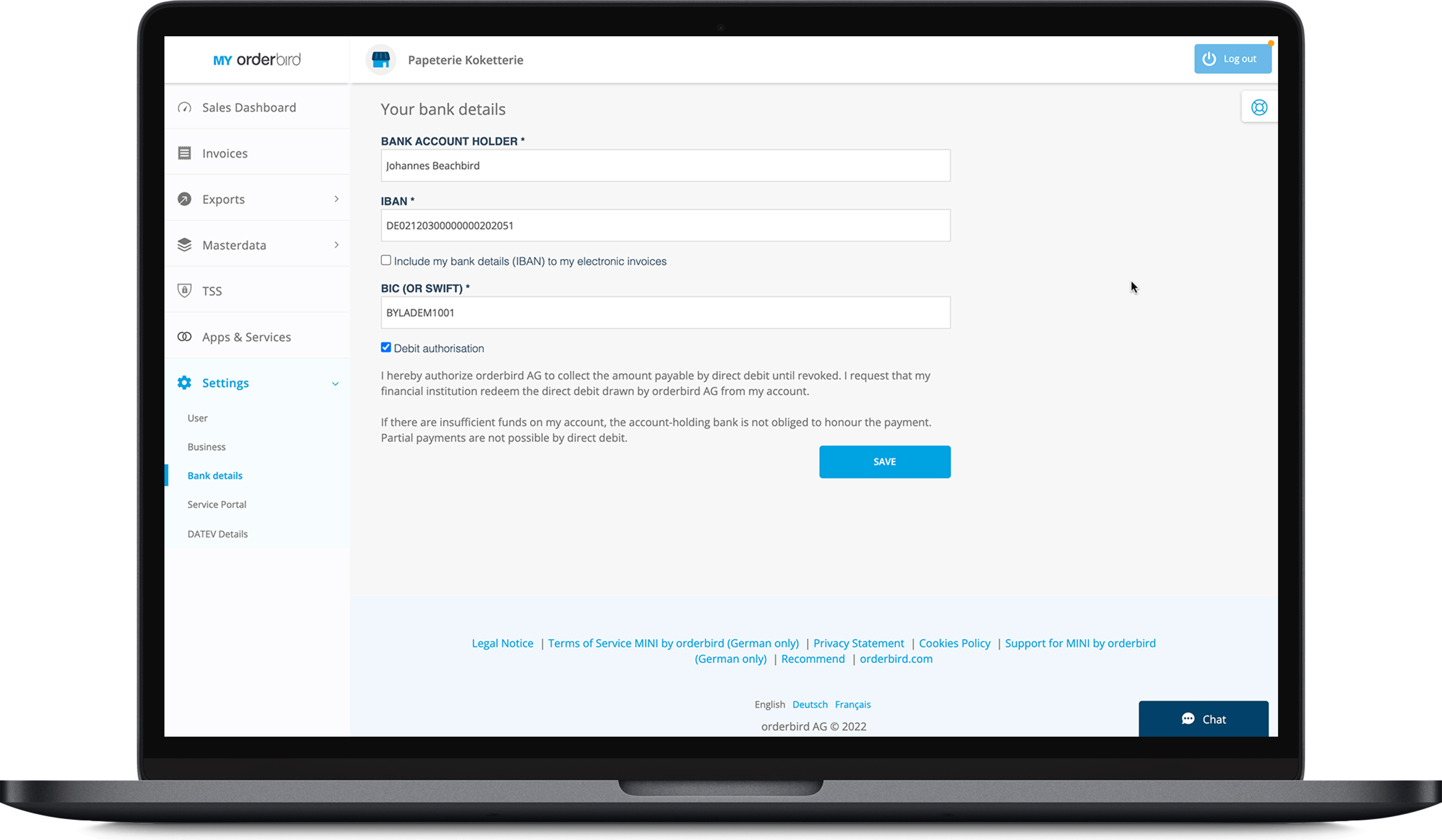
If you would like to deposit a new bank account for the debiting of your license with orderbird, you can easily do this at MY orderbird. No more worries about forgetting to pay your license on time.

Important: Changing your bank details via MY orderbird only affects the license. If you want to change your bank details for Worldline payments, you can find all the information here: Your Worldline account: Login and data management.

  1. Log in to MY orderbird.
  2. Go to Settings > Bank details.
    EN_MINI_MYorderbird_01.png
  3. Enter the name of the bank account holder, the IBAN and the BIC (or SWIFT).
  4. Check "Debit authorization" to authorize orderbird to debit the license fees via SEPA direct debit mandate.
    Important: Direct debit is currently the only possible payment method for your orderbird MINI license. Please make sure to check the box so you are able to work with a valid license.
  5. Click on "Save".
my orderbird bank update

Was this article helpful?

Yes
No
Give feedback about this article

Ähnliche Artikel

  • Important things if you change the name or the ownership of your company or sell your device
  • Question, problem or feedback? Chat with us!
  • I made a typo in my email address during registration
  • I did not receive the activation email

Über die orderbird GmbH

Mit über 17.000 Kunden – Restaurants, Cafés, Bars, Clubs, Eisdielen und Biergärten – zählt orderbird zu den führenden Kassensystemen der Gastronomiebranche in Europa. Mit der mobilen Kasse orderbird MINI bietet orderbird darüber hinaus auch eine smarte Kassenlösung für Dienstleister, den Einzelhandel und das Handwerk.

Die orderbird GmbH wurde 2011 von Jakob Schreyer, Bastian Schmidtke, Patrick Brienen-Lucius und Artur Hasselbach gegründet und beschäftigt heute mehr als 130 Mitarbeitende.

Adresse

orderbird GmbH
Ritterstraße 12
D-10969 Berlin
Tel.: 030 208 983 098

Öffnungszeiten

Montag: 09:00 - 18:00 Uhr
Dienstag: 09:00 - 18:00 Uhr
Mittwoch: 09:00 - 18:00 Uhr
Donnerstag: 09:00 - 18:00 Uhr
Freitag: 09:00 - 18:00 Uhr
Samstag: Geschlossen (außer Notfall-Support)
Sonntag: Geschlossen (außer Notfall-Support)


© 2026 orderbird GmbH
  • Impressum
  • Datenschutzerklärung
  • AGB
Expand

Translation Unavailable

This article is currently available only in German. You are viewing the German version.