Download your DATEV report - orderbird MINI

Contact Us

If you still have questions or prefer to get help directly from an agent, please submit a request.
We’ll get back to you as soon as possible.

Please fill out the contact form below and we will reply as soon as possible.

  • Handbuch orderbird MINI
  • Kontakt aufnehmen
English (US)
US English (US)
DE German
  • Startseite
  • Analyzing
  • DATEV

Download your DATEV report

Written by Jens B.

Updated at October 20th, 2025

Contact Us

If you still have questions or prefer to get help directly from an agent, please submit a request.
We’ll get back to you as soon as possible.

Please fill out the contact form below and we will reply as soon as possible.

  • Starting
    First steps with your orderbird MINI Helpful information to get started Warranty information & care tips Card payment registration TSS and tax number
  • Working
    Deposit Users & Permissions Vouchers Daily work App settings
  • Analyzing
    MY orderbird - Analyze & export sales data MY orderbird - Digital receipts and receipt archive Everything about cashless payment with our partner Worldline American Express DATEV KassenSichV & GoBD Everything about cashless payment with and orderbird MINI our partner Nexi Germany
  • Cashbook
    Starting with your orderbird MINI cashbook Working with your orderbird MINI cashbook
  • Updating
  • Account and Hardware
    Info about your orderbird MINI Your MY orderbird account Multi user: you have more than one MINI device
+ More

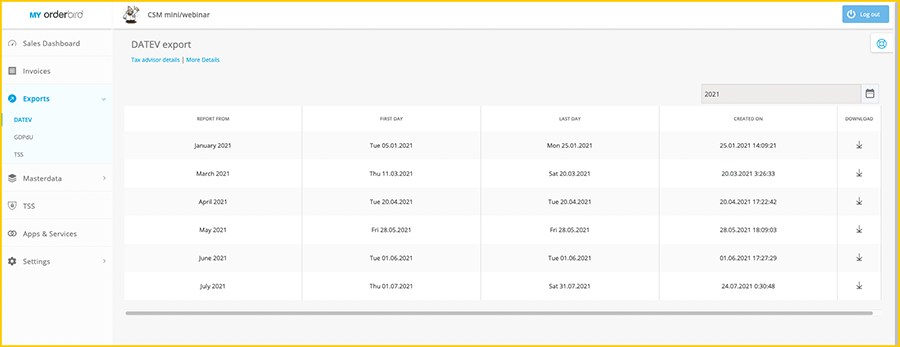
On MY orderbird you will find the DATEV export for your tax advisor.

  1. Log in to MY orderbird with your access data.
  2. Go to Data export > DATEV.
  3. If you want to download an existing report, click the arrow at the end of the row. You can save the export to your computer and forward it to your tax advisor via email.
    MINI_7.4_EN_MYob_08.png
  4. To create a new report, click on [Create DATEV Export].
  5. Specify the time period for which you need the report by entering a start and end date. If you'd like, you can send the report directly via email, for example to your tax office. Otherwise, leave the email field empty and download the report later from the MY orderbird page.


Your tax advisor can import the orderbird MINI DATEV export into any standard software that supports the DATEV format, allowing for quick and easy processing of your sales data.

downloading datev export

Was this article helpful?

Yes
No
Give feedback about this article

Ähnliche Artikel

  • DATEV setup Step 1: MY orderbird
  • Why do account numbers that I have not entered appear in my DATEV export?
  • How is the DATEV export of orderbird structured? (Info for tax advisors)
  • Can discounts be analyzed with the DATEV report?

Über die orderbird GmbH

Mit über 17.000 Kunden – Restaurants, Cafés, Bars, Clubs, Eisdielen und Biergärten – zählt orderbird zu den führenden Kassensystemen der Gastronomiebranche in Europa. Mit der mobilen Kasse orderbird MINI bietet orderbird darüber hinaus auch eine smarte Kassenlösung für Dienstleister, den Einzelhandel und das Handwerk.

Die orderbird GmbH wurde 2011 von Jakob Schreyer, Bastian Schmidtke, Patrick Brienen-Lucius und Artur Hasselbach gegründet und beschäftigt heute mehr als 130 Mitarbeitende.

Adresse

orderbird GmbH
Ritterstraße 12
D-10969 Berlin
Tel.: 030 208 983 098

Öffnungszeiten

Montag: 09:00 - 18:00 Uhr
Dienstag: 09:00 - 18:00 Uhr
Mittwoch: 09:00 - 18:00 Uhr
Donnerstag: 09:00 - 18:00 Uhr
Freitag: 09:00 - 18:00 Uhr
Samstag: Geschlossen (außer Notfall-Support)
Sonntag: Geschlossen (außer Notfall-Support)


© 2026 orderbird GmbH
  • Impressum
  • Datenschutzerklärung
  • AGB
Expand

Translation Unavailable

This article is currently available only in German. You are viewing the German version.