Problems with printing? - orderbird MINI

Contact Us

If you still have questions or prefer to get help directly from an agent, please submit a request.
We’ll get back to you as soon as possible.

Please fill out the contact form below and we will reply as soon as possible.

  • Handbuch orderbird MINI
  • Kontakt aufnehmen
English (US)
US English (US)
DE German
  • Startseite
  • Account and Hardware
  • Info about your orderbird MINI

Problems with printing?

Written by Jens B.

Updated at November 21st, 2025

Contact Us

If you still have questions or prefer to get help directly from an agent, please submit a request.
We’ll get back to you as soon as possible.

Please fill out the contact form below and we will reply as soon as possible.

  • Starting
    First steps with your orderbird MINI Helpful information to get started Warranty information & care tips Card payment registration TSS and tax number
  • Working
    Deposit Users & Permissions Vouchers Daily work App settings
  • Analyzing
    MY orderbird - Analyze & export sales data MY orderbird - Digital receipts and receipt archive Everything about cashless payment with our partner Worldline American Express DATEV KassenSichV & GoBD Everything about cashless payment with and orderbird MINI our partner Nexi Germany
  • Cashbook
    Starting with your orderbird MINI cashbook Working with your orderbird MINI cashbook
  • Updating
  • Account and Hardware
    Info about your orderbird MINI Your MY orderbird account Multi user: you have more than one MINI device
+ More

Übersicht

The receipt is empty Paper jam Receipt printed too pale Printer busy Delayed Printing? Digital Receipt as a Temporary Solution Nothing helps?

You have issues printing your receipts? Find the possible scenarios and the solution here!

The receipt is empty

Are you using thermal paper? The thermal printer is using heat to print, which is only possible on thermal paper. Like this you never run out of ink! But you need the right kind of paper.

Check if the receipt roll is inserted correctly! Pay attention to the illustration in the receipt roll slot.

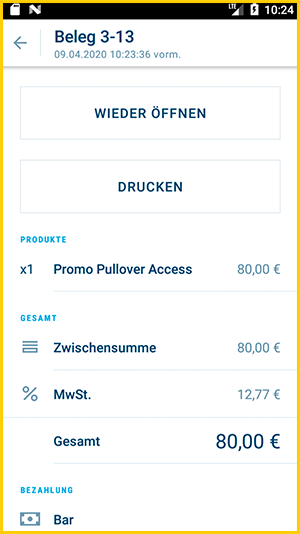
Via [Menu] > [Transactions] you can view the receipt and print it again: 
Paper jam

Possibly an unclean tear-off edge got stuck. Open the paper slot, take the receipt roll out and insert it again, so that the paper hangs out approx. 1 cm.

You can print the receipt again via [Main menu] > [Transactions].

Receipt printed too pale

Open the paper slot and carefully clean the top side with a small soft brush or a clean (!) soft toothbrush or a cotton swab.

Sometimes the printer has to warm up a bit. After a few prints, the writing will be clearly visible again.

Printer busy

If you see a small printer icon at the top left of the screen, it means that there is still a print job in progress. Just be patient - as soon as the process is finished, the printer will work again.

Otherwise try to reboot your device to cancel the previous print job. 

Delayed Printing?

If you’re experiencing a delay when printing receipts, first check your internet connection. If everything seems fine, please contact our support team — either via our contact form or via the chat on MY orderbird or directly on your MINI. The reasons for this issue can vary.

Digital Receipt as a Temporary Solution

If you need to issue a receipt in the meantime, you can use the digital receipt, the eReceipt.


Nothing helps?

Please contact us via our contact form or via the chat on MY orderbird or directly on your MINI. We will then contact you to solve the problem remotely or, if necessary, to clarify the shipment of a new device.

Until then, you can send the invoices to the customers via MY orderbird by email. You can find instructions here: Send invoices by email.

printing errors print issues troubleshooting ink paint

Was this article helpful?

Yes
No
Give feedback about this article

Ähnliche Artikel

  • The orderbird MINI basics
  • How to change the receipt roll
  • Switching on orderbird MINI is not possible
  • Accessories for your orderbird MINI

Über die orderbird GmbH

Mit über 17.000 Kunden – Restaurants, Cafés, Bars, Clubs, Eisdielen und Biergärten – zählt orderbird zu den führenden Kassensystemen der Gastronomiebranche in Europa. Mit der mobilen Kasse orderbird MINI bietet orderbird darüber hinaus auch eine smarte Kassenlösung für Dienstleister, den Einzelhandel und das Handwerk.

Die orderbird GmbH wurde 2011 von Jakob Schreyer, Bastian Schmidtke, Patrick Brienen-Lucius und Artur Hasselbach gegründet und beschäftigt heute mehr als 130 Mitarbeitende.

Adresse

orderbird GmbH
Ritterstraße 12
D-10969 Berlin
Tel.: 030 208 983 098

Öffnungszeiten

Montag: 09:00 - 18:00 Uhr
Dienstag: 09:00 - 18:00 Uhr
Mittwoch: 09:00 - 18:00 Uhr
Donnerstag: 09:00 - 18:00 Uhr
Freitag: 09:00 - 18:00 Uhr
Samstag: Geschlossen (außer Notfall-Support)
Sonntag: Geschlossen (außer Notfall-Support)


© 2026 orderbird GmbH
  • Impressum
  • Datenschutzerklärung
  • AGB
Expand

Translation Unavailable

This article is currently available only in German. You are viewing the German version.