Inherit prices and tax rates of the folder to products - orderbird MINI

Contact Us

If you still have questions or prefer to get help directly from an agent, please submit a request.
We’ll get back to you as soon as possible.

Please fill out the contact form below and we will reply as soon as possible.

  • Handbuch orderbird MINI
  • Kontakt aufnehmen
English (US)
US English (US)
DE German
  • Startseite
  • Working
  • Daily work

Inherit prices and tax rates of the folder to products

Written by Jens B.

Updated at June 30th, 2025

Contact Us

If you still have questions or prefer to get help directly from an agent, please submit a request.
We’ll get back to you as soon as possible.

Please fill out the contact form below and we will reply as soon as possible.

  • Starting
    First steps with your orderbird MINI Helpful information to get started Warranty information & care tips Card payment registration TSS and tax number
  • Working
    Deposit Users & Permissions Vouchers Daily work App settings
  • Analyzing
    MY orderbird - Analyze & export sales data MY orderbird - Digital receipts and receipt archive Everything about cashless payment with our partner Worldline American Express DATEV KassenSichV & GoBD Everything about cashless payment with and orderbird MINI our partner Nexi Germany
  • Cashbook
    Starting with your orderbird MINI cashbook Working with your orderbird MINI cashbook
  • Updating
  • Account and Hardware
    Info about your orderbird MINI Your MY orderbird account Multi user: you have more than one MINI device
+ More

Übersicht

This is how it works Step 1: Set prices and tax rates in the folder. Step 2: Activate the inheritance in the product settings. Note for Small Businesses Regarding Legal and Tax Advice

Since July 2023 you have the possibility to set prices and tax rates in your item list via the folders. These can then be inherited by the items in the folder.

This is how it works

Step 1: Set prices and tax rates in the folder.

  1. In your MINI, go to Menu > Item list > Folder.
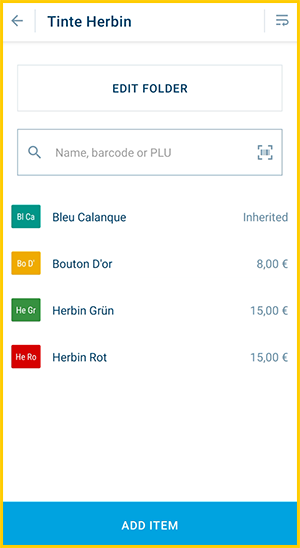
  2. Create a new folder or tap on one to edit it.
  3. Now, in addition to name, color and DATEV accounts, you also have the fields for prices and tax rates, both In-House and Take Away (or only one if you have deactivated the switch: Customize or hide "In-House" & "Take Away" ordering methods ).
  4. Enter price and tax.
  5. And at the top, click on [Save].
  6. Now, you can inherit these prices and tax rates to items in this folder - but you don't have to. You decide which items should inherit from the folder, and for which you store your own data. If an item should inherit, then it continues with ...

Step 2: Activate the inheritance in the product settings.

  1. Create a new item or tap on one to edit it. For new items, first enter the General Information.
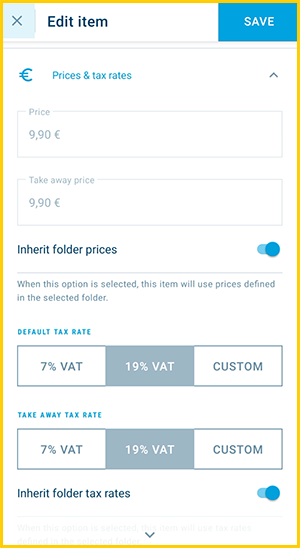
  2. Then go to "Price and tax rates". Here you can enter your own values or activate the inheritance slider under the fields.
  3. Remember that…
    • You can only inherit from the folder the item is in.
    • You can inherit prices and tax rates separately. I.e. if you want to inherit both, both inheritance sliders must be activated.
  4. If all other settings fit, tap on [Save] at the top.
  5. Done!

By the way: the category and product settings are explained in detail here: Step 4 - Add your item list: Folders and items.

Note for Small Businesses

If you operate a small business (e.g., under § 19 of the German VAT Act), you do not charge VAT on your sales. This means you should set all tax rates in your POS system to 0%.

The easiest way to do this is by setting the tax rate to 0% in your categories and allowing your products to automatically inherit the tax rate from the assigned category.

Please also consult your tax advisor to determine which wording must appear in the footer of your receipts to properly indicate the VAT exemption.
You can learn how to edit the footer of your receipts in the POS system here: Customize Your Receipt and Keep It Up to Date 


Regarding Legal and Tax Advice

Regarding Legal and Tax Advice

Please note: orderbird does not provide legal or tax advice!

Everything we write reflects our experience and the experiences of our customers. Any information related to legal or tax aspects should not be considered legal or tax advice under any circumstances. Therefore, a procedure we describe may not be applicable to you or your business specifically.

For definitive statements, please consult your tax advisor. orderbird disclaims any liability for the accuracy, correctness, and completeness of the information provided here regarding tax-related procedures.


tax rates price inheritance

Was this article helpful?

Yes
No
Give feedback about this article

Ähnliche Artikel

  • Receipt for entertainment expenses / Hospitality receipt
  • Ordering and checkout
  • Restrict the use of custom discounts
  • Receipt roll format

Über die orderbird GmbH

Mit über 17.000 Kunden – Restaurants, Cafés, Bars, Clubs, Eisdielen und Biergärten – zählt orderbird zu den führenden Kassensystemen der Gastronomiebranche in Europa. Mit der mobilen Kasse orderbird MINI bietet orderbird darüber hinaus auch eine smarte Kassenlösung für Dienstleister, den Einzelhandel und das Handwerk.

Die orderbird GmbH wurde 2011 von Jakob Schreyer, Bastian Schmidtke, Patrick Brienen-Lucius und Artur Hasselbach gegründet und beschäftigt heute mehr als 130 Mitarbeitende.

Adresse

orderbird GmbH
Ritterstraße 12
D-10969 Berlin
Tel.: 030 208 983 098

Öffnungszeiten

Montag: 09:00 - 18:00 Uhr
Dienstag: 09:00 - 18:00 Uhr
Mittwoch: 09:00 - 18:00 Uhr
Donnerstag: 09:00 - 18:00 Uhr
Freitag: 09:00 - 18:00 Uhr
Samstag: Geschlossen (außer Notfall-Support)
Sonntag: Geschlossen (außer Notfall-Support)


© 2026 orderbird GmbH
  • Impressum
  • Datenschutzerklärung
  • AGB
Expand

Translation Unavailable

This article is currently available only in German. You are viewing the German version.